
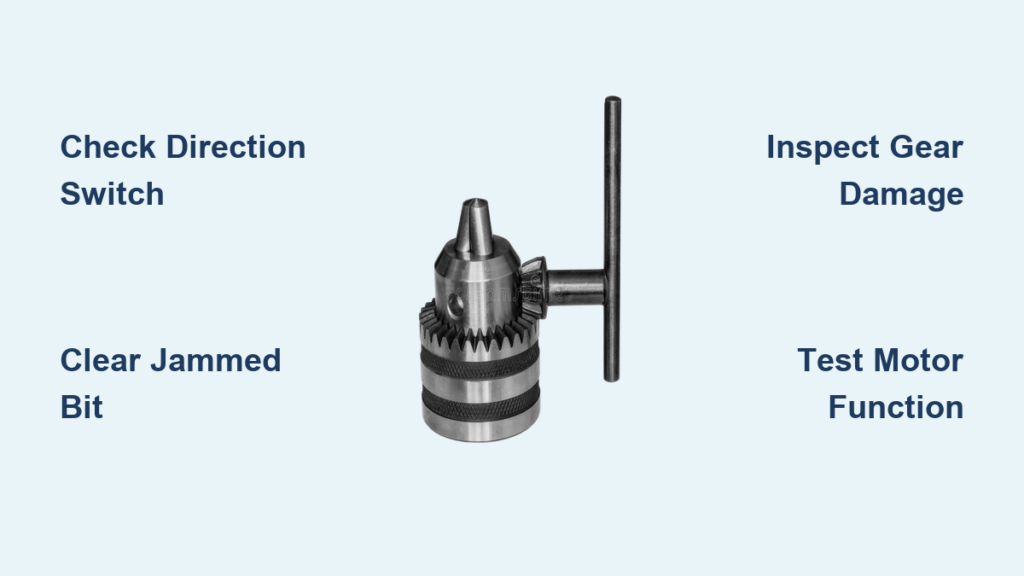
Nothing halts your progress on a home improvement project faster than picking up your drill only to discover the drill chuck not spinning properly. Whether it’s completely frozen, spinning weakly, or only working in one direction, this common issue can transform your reliable power tool into a frustrating paperweight. When your drill chuck stops spinning, it’s almost always a solvable problem rather than a death sentence for your tool. Most causes stem from simple mechanical issues or preventable wear that you can diagnose and repair yourself with basic tools and minimal expertise. In this guide, you’ll learn exactly how to identify why your drill chuck won’t spin and implement practical fixes that get your tool back in action—often in under 30 minutes—saving you the cost of professional repair or premature replacement.
Diagnosing Your Drill’s Spinning Failure Immediately
Before grabbing your screwdrivers, perform these critical diagnostic steps that solve the problem 30% of the time without any disassembly. The most overlooked cause of a drill chuck not spinning is simply having the direction switch set to reverse while expecting forward rotation. Toggle your drill’s direction switch to the forward position and test again—many users accidentally bump this switch during storage or transport. If your chuck spins weakly or inconsistently, check your battery charge level; a dying battery often provides enough power to activate the trigger but not enough torque to rotate the chuck effectively under load.
Is Your Drill Actually in Forward Mode?
Confirm your drill’s direction selector is properly engaged in forward position by physically feeling the switch click into place. Some models develop worn detents that allow the switch to rest between positions, causing partial engagement. With the drill unplugged or battery removed, manually rotate the chuck while toggling the direction switch—you should feel distinct resistance changes as it moves between forward, neutral, and reverse positions. If the switch moves too freely without noticeable clicks, internal contacts may be failing, requiring further investigation in the electrical components section.
Distinguishing Electrical From Mechanical Failures
Listen carefully when you pull the trigger: a humming sound with no rotation indicates power is reaching the motor but mechanical components have failed. Complete silence suggests an electrical issue with the trigger, wiring, or motor windings. For cordless drills, try a fully charged spare battery if available—many assume their battery is charged when it’s actually degraded beyond useful capacity. You can also test electrical continuity by connecting a multimeter to the motor terminals while depressing the trigger; consistent voltage readings confirm power delivery while inconsistent or zero readings point to trigger switch failure.
Critical Safety Steps Before Drill Repair
Never attempt repairs on a powered drill—this cannot be overstated. For corded models, physically unplug from the wall outlet, not just turn off a switch. For cordless drills, remove the battery pack completely and press the trigger for 5 seconds to discharge residual power. Working on a charged drill risks severe electrical shock or accidental activation that can crush fingers. Always wear ANSI-approved safety glasses to protect against flying metal shavings during disassembly, especially when dealing with stripped gears that may have sharp edges.
Power Disconnection: The Non-Negotiable First Step
Verify power disconnection by attempting to activate the drill after unplugging or removing the battery. If the drill shows any sign of power, stop immediately and double-check your disconnection method. For stubborn corded drills that still show signs of power, inspect for damaged cords that might be creating a ground fault—this requires professional electrical repair rather than chuck troubleshooting. Keep your workspace well-lit and organized to prevent misplacing small components during disassembly, which commonly happens when working under poor lighting conditions.
Quick Checks That Might Solve Your Problem Immediately
Before disassembling your drill, conduct these 2-minute inspections that resolve most “drill chuck not spinning” issues without tools. Remove the drill bit completely and manually rotate the chuck jaws—many users mistake a jammed bit for a mechanical failure. Inspect for metal shavings packed between the chuck jaws that prevent proper tightening; use a toothpick or small brush to clear debris without damaging precision surfaces. Ensure you’re not accidentally engaging the clutch setting at too low a torque level, which causes the mechanism to slip rather than rotate the chuck.
Verifying the Forward/Reverse Switch Position
Toggle your drill’s direction switch rapidly 10-15 times while lightly pressing the trigger—this often cleans oxidized contacts in older models. If the chuck spins intermittently during this process, the switch needs cleaning or replacement. For drills with electronic speed control, try starting at maximum speed setting then reducing; some failing circuits only deliver power at full throttle. If your drill has a lock-off button (common on cordless models), ensure it’s not accidentally engaged, which prevents trigger activation entirely.
Diagnosing a Jammed Drill Bit or Chuck Mechanism
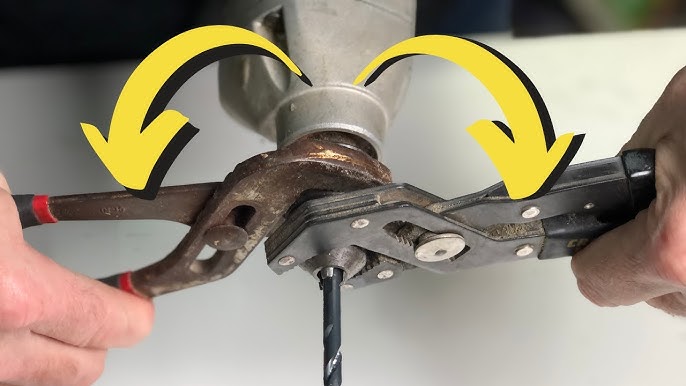
Nearly 40% of “drill chuck not spinning” cases stem from a simple bit jam. Insert a properly sized chuck key and rotate counterclockwise while applying firm downward pressure—sometimes the self-tightening mechanism has over-clamped the bit. If using a keyless chuck, grip the front and rear sections firmly and rotate in opposite directions with significant force. For stubborn bits, tap the chuck key gently with a rubber mallet while maintaining rotational pressure; avoid metal hammers that can damage precision components.
Clearing Debris from Chuck Jaws Without Causing Damage
Create a cleaning solution of equal parts penetrating oil and mineral spirits in a small container. Dip an old toothbrush in the mixture and thoroughly scrub between the chuck jaws while rotating the chuck manually. The oil mixture dissolves stubborn grease and metal filings that cause binding. After cleaning, wipe thoroughly with a lint-free cloth and apply a single drop of light machine oil to each jaw channel. Never use WD-40 as a lubricant—its petroleum base evaporates quickly and leaves sticky residue that attracts more debris.
Inspecting and Repairing the Chuck Assembly
A loose chuck on the arbor (spindle) creates the illusion of a non-spinning mechanism. With the chuck fully opened, grip it firmly and attempt to wiggle it side-to-side—excessive movement indicates a loose taper fit. To secure a loose chuck, insert the appropriate size hex key into the chuck, place it in reverse mode, then firmly pull the trigger for 2-3 seconds. This reseats the chuck on the arbor’s tapered shaft. For severely loose chucks, you may need to remove the chuck completely using a specialized chuck removal tool available at hardware stores.
Tightening Techniques for Keyless and Keyed Chucks
When tightening keyless chucks, grip both the front collar and body simultaneously and rotate with maximum hand strength—many users fail to achieve proper tension by only turning one section. For keyed chucks, insert the key at three equally spaced points and apply firm, even pressure at each position. Never use pliers or wrenches on chuck components, as this damages precision surfaces and creates future spinning problems. If your chuck consistently loosens during use, the internal threads may be worn beyond repair, requiring chuck replacement—a 10-minute job that costs less than $20 for most standard models.
Troubleshooting Gear System Failures

Open your drill’s gear housing according to the manufacturer’s instructions (typically removing 4-6 screws from the lower casing). Shine a flashlight into the gear assembly while manually rotating the chuck—you should see all gears moving in sequence. Stripped gears show visible missing teeth, often on the plastic reduction gears common in budget drills. If you find stripped gears, check for metal shavings throughout the housing; these indicate secondary damage that must be cleaned before installing new gears. A single metal shaving caught between gear teeth can cause immediate failure of new replacement parts.
Recognizing Stripped Gears in Your Drill
Compare gear wear patterns—uniform wear suggests normal aging while clustered damage indicates impact overload from using improper bits or excessive force. Plastic gears with hairline cracks will fail completely within weeks, so replace them proactively. When installing new gears, apply a pea-sized amount of high-temperature grease to each gear mesh point; ordinary grease melts under drill operating temperatures, causing premature wear. Always test gear operation manually before reassembling your drill to confirm smooth rotation without binding points.
Testing Motor Functionality and Electrical Components
Expose the motor by removing the gear housing, then reconnect power briefly while observing the motor shaft (keep fingers clear). If the shaft spins but the gears don’t engage, the problem lies in the transmission coupling. If the motor hums but doesn’t rotate, the armature may be seized—tap the motor housing gently with a rubber mallet while activating the trigger, which sometimes frees stuck components. Complete silence with power applied indicates either a failed motor winding or disconnected wiring that requires tracing with a multimeter.
Checking the Trigger Switch for Power Delivery Problems
Disassemble the trigger housing and inspect the copper contacts for pitting or carbon buildup. Clean contacts gently with a pencil eraser, then test continuity with a multimeter while depressing the trigger through its full range. Intermittent readings indicate worn contacts requiring replacement. For variable-speed triggers, ensure the potentiometer moves smoothly without sticky spots. When reconnecting wiring, double-check that no loose strands are touching adjacent terminals—a common cause of short circuits that destroy motors.
Preventing Future Drill Chuck Spinning Issues
Establish a 30-second post-use routine that prevents 90% of chuck spinning failures. After each use, run the drill briefly with no bit inserted to expel dust from the chuck mechanism. Store your drill vertically with the chuck fully opened to prevent spring tension from deforming internal components during storage. Every 10 charging cycles (or monthly for corded drills), apply a single drop of light machine oil to the chuck’s moving parts while rotating it manually—excess oil attracts dust that causes binding.
Proper Lubrication Techniques for Drill Mechanisms
Use only lubricants specifically formulated for power tools—automotive or household oils contain additives that damage plastic components common in modern drills. Apply lubricant sparingly with a toothpick directly to moving surfaces rather than spraying, which creates overspray that attracts debris. After lubrication, operate the chuck through its full opening/closing cycle 10-15 times to distribute the oil evenly, then wipe away any excess with a clean cloth. This simple maintenance extends chuck life by 3-5 years for most DIY users.
When Your Drill Needs Professional Repair
Consider professional service when you hear grinding noises during operation, notice burning smells from the motor, or see visible arcing inside the tool. These indicate serious internal damage beyond typical DIY repair capabilities. For drills under warranty, always contact the manufacturer first—attempting repairs yourself voids most warranties. Evaluate repair costs against replacement value; for drills costing under $50 new, professional repair rarely makes economic sense unless it’s a sentimental or specialty tool.
Don’t waste hours struggling with persistent chuck spinning issues when simple diagnostic steps can pinpoint the problem. By following this guide’s systematic approach, you’ve likely identified and fixed your drill chuck not spinning problem in under an hour. Remember that regular maintenance prevents most failures—spend those 30 seconds after each use cleaning and lubricating your tool. For immediate future projects, keep a backup drill available while repairing your primary tool, and always verify chuck operation before starting critical work. With proper care, your drill will deliver reliable spinning performance for years to come.



