

You’re in the middle of a critical project when suddenly your Black & Decker drill won’t tighten properly on the bit. The chuck spins uselessly, refusing to grip the drill bit as you tighten it, leaving you frustrated and unable to complete your work. This common power tool malfunction affects thousands of DIYers and professionals each year, but the good news is that in 90% of cases, a drill that won’t tighten can be fixed with simple cleaning or a straightforward repair. Whether you’re working with drywall, wood, or metal, understanding why your Black & Decker drill won’t tighten properly and how to fix it can save you time, money, and the hassle of replacing a perfectly good tool. This guide will show you exactly how to diagnose and repair your drill chuck so you can get back to work immediately.
Why Your Black & Decker Drill Won’t Tighten: Common Causes
Drywall Dust and Debris Clogging Your Chuck
Drywall dust is public enemy number one for drill chucks that won’t tighten properly. When gypsum particles infiltrate your chuck mechanism, they mix with existing lubricant to form an abrasive paste that prevents smooth operation. This is especially common with Black & Decker drills used for electrical work or hanging drywall. If you’ve recently been working with drywall, compressed air (30-40 PSI recommended) is your first line of defense. Shine a light inside the chuck while it’s fully open—you’ll likely see a white or gray buildup that needs removal. Left unaddressed, this dust hardens over time, making your drill chuck increasingly difficult to operate until it completely fails to tighten.
Worn Chuck Jaws That Can’t Grip Drill Bits
After hundreds of uses, the gripping surfaces of your chuck jaws wear down, creating the classic “drill won’t tighten” problem where bits slip under pressure. Inspect each jaw closely for rounded edges or visible wear patterns—these won’t grip bits securely no matter how tightly you turn the chuck. A simple test: insert a 1/4″ hex shank bit (known to be straight) and tighten the chuck. If you can easily rotate the bit with your fingers, the jaws are worn beyond useful service. This wear happens gradually, which is why many users don’t notice their chuck is failing until it completely stops tightening. Keyless chucks typically show wear faster than keyed models due to the constant hand-tightening pressure.
Missing Reverse-Thread Retaining Screw
Many Black & Decker drills have a critical reverse-thread retaining screw inside the chuck that’s often overlooked. If this screw has worked loose or been lost, your chuck won’t tighten properly because it’s not securely attached to the spindle. This special screw uses left-handed threading (remember: “righty-loosey” for this component), so standard tightening techniques actually loosen it further. Check inside your chuck with a flashlight—when fully opened, you should see a small screw head. If it’s missing or loose, this explains why your drill won’t tighten consistently. The screw serves as a safety mechanism to prevent the chuck from unscrewing during normal operation.
Essential Safety Steps Before Fixing Your Drill Chuck
Unplug or Remove Battery: Non-Negotiable First Step
Before you touch a single tool, disconnect power from your Black & Decker drill. For corded models, unplug from the outlet. For cordless drills, remove the battery pack completely. This safety step prevents accidental activation that could cause serious injury while working on the chuck mechanism. I’ve seen too many DIYers skip this crucial step when frustrated with a drill that won’t tighten, only to have the drill activate unexpectedly during repair. Make this your automatic first action every time you work on power tools—your fingers will thank you.
Eye Protection and Workspace Setup for Safe Repair
Wear safety glasses before starting any chuck repair. During cleaning, debris can dislodge and become airborne, posing eye injury risks. Set up in a clean, well-lit workspace with a soft cloth underneath to catch small parts. Lay out all your tools beforehand: compressed air, appropriate Allen keys, machine oil, and cleaning brushes. Organizing your workspace prevents losing critical components like the reverse-thread retaining screw, which is small enough to disappear into carpeting forever. Proper preparation makes the repair process for your “won’t tighten” drill go smoothly and safely.
Diagnose Your “Won’t Tighten” Problem in 3 Minutes

The Visual Inspection: Spotting Damaged Chuck Jaws
With your drill safely powered down, open the chuck fully and inspect each jaw. Look for visible damage like cracks, dents, or uneven wear patterns. Rotate the chuck sleeve slowly while watching the jaws move—they should open and close smoothly and evenly. If one jaw lags or doesn’t move properly, that’s your culprit. Check for play by trying to wiggle the chuck; excessive movement indicates internal damage beyond simple cleaning. This quick visual diagnosis tells you whether you’re dealing with a simple debris issue or a more serious mechanical failure causing your Black & Decker drill won’t tighten problem.
The Bit Slip Test: Confirming Your Chuck’s Grip Failure
Insert a clean, undamaged drill bit and tighten the chuck as you normally would. Apply firm rotational pressure with your hand—if the bit slips, your chuck isn’t gripping properly. Try this with multiple bits of different sizes. If all bits slip, the problem is definitely with the chuck mechanism. If only smaller bits slip, you might have worn jaws that can’t properly grip smaller diameters. This simple test confirms whether cleaning will solve your “drill won’t tighten” issue or if component replacement is necessary.
3-Minute Fix: Cleaning Your Black & Decker Drill Chuck
Removing Drywall Dust with Compressed Air (30-40 PSI)
Most “won’t tighten” issues stem from debris buildup. Start with compressed air at 30-40 PSI directed into the chuck while rotating it slowly. Hold the chuck open with one hand while blasting air through all angles. For stubborn drywall dust, follow with a light spray of isopropyl alcohol to dissolve gypsum buildup, then blow dry again. Never use excessive pressure that could force debris deeper into the mechanism. After cleaning, work the chuck open and closed several times by hand to ensure smooth operation before testing with a bit.
Proper Lubrication: Machine Oil vs. WD-40 Mistakes
Apply one drop of light machine oil (3-in-1 oil works perfectly) to the visible threads and jaw mechanisms. Work the chuck open and closed to distribute the lubricant evenly. Crucial tip: Never use WD-40 as a lubricant—it displaces existing oil and attracts more dust, worsening your drill won’t tighten problem. Wipe away excess oil to prevent dust accumulation. The right lubrication creates a protective barrier against future debris without compromising grip. This simple step solves most minor chuck tightening issues in under five minutes.
When Cleaning Isn’t Enough: Diagnosing Worn Components
How to Check for Worn Chuck Jaws
With the chuck fully open, examine each jaw’s gripping surface. New jaws have sharp, defined teeth; worn jaws appear rounded or flattened. Measure jaw wear with a caliper if available—excessive wear shows as inconsistent measurements across jaws. Try tightening on a known-good bit: if the chuck closes unevenly or doesn’t seat fully around the bit, replacement is necessary. Worn jaws simply can’t generate enough friction to prevent bit slippage, explaining why your Black & Decker drill won’t tighten properly despite your efforts.
Testing for Excessive Runout (>0.5mm)
Excessive wobble indicates serious chuck damage. Insert a straight rod or drill bit and tighten the chuck. Rotate slowly while observing the bit’s tip—if it describes a circle larger than 0.5mm in diameter, your chuck has too much runout. This wobble prevents proper bit seating and causes your drill won’t tighten sensation. Minor runout (<0.1mm) is acceptable, but anything above 0.5mm means component replacement is needed. This test confirms whether your chuck can be saved or requires complete replacement.
Step-by-Step: Removing a Seized Black & Decker Chuck
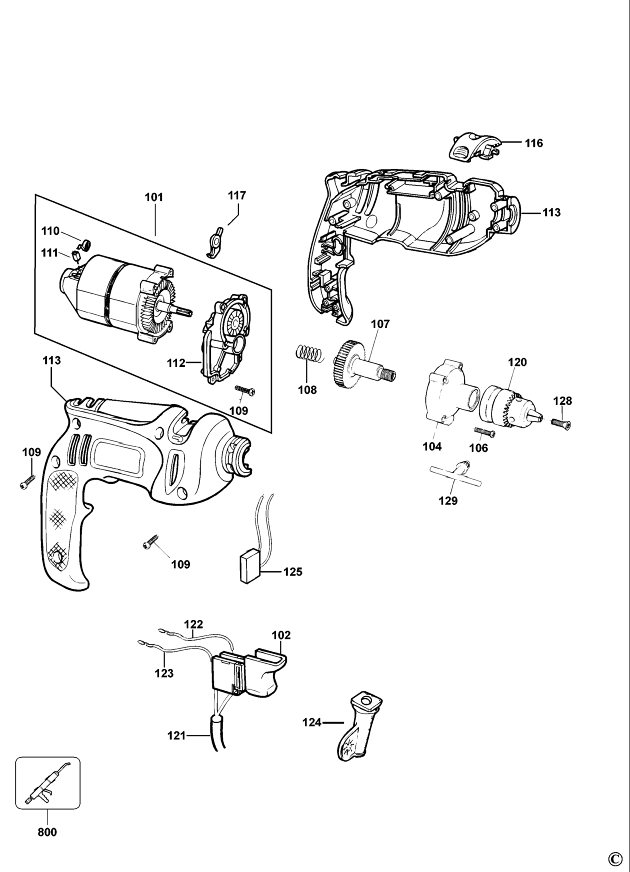
Finding the Reverse-Thread Retaining Screw
Remove the battery, then open the chuck fully. Inside, you’ll find a small screw—this is the reverse-thread retaining screw. Unlike standard screws, you loosen it by turning clockwise (righty-loosey). If it’s stuck, apply penetrating oil and wait 30 minutes before attempting removal. Use the exact size Allen key to avoid stripping the screw head. This critical step determines whether you can fix your “drill won’t tighten” issue yourself or need professional help.
Safe Removal Technique Without Damaging the Spindle
After removing the retaining screw, secure the drill firmly in a soft-jawed vise (protecting the housing). Insert an appropriate hex key into the chuck and strike the handle with a rubber mallet to break initial resistance. Then, turn the chuck counter-clockwise to unscrew it from the spindle. Never use excessive force—applying too much torque can damage internal gears. This careful approach preserves your drill’s functionality while solving the tightening problem.
When to Repair vs. Replace Your Black & Decker Drill

Cost Analysis: $15 Fix vs. $60+ New Drill
Most chuck repairs cost $15-40 in parts and take 1-3 hours of your time. A replacement Black & Decker drill starts around $60 for basic models. If your repair costs exceed 50% of a new drill’s price, consider replacement—especially if your drill shows other signs of wear. For newer models or higher-end drills, replacement parts usually make economic sense. This simple cost-benefit analysis prevents wasting money on repairs that don’t make sense for your specific situation.
Warning Signs Your Drill Needs Professional Help
Seek professional assistance if you notice excessive play in the spindle, grinding noises from the gearbox, or if the chuck won’t budge despite proper removal techniques. These indicate internal damage beyond typical “won’t tighten” issues. Attempting advanced repairs without proper tools risks further damage to your Black & Decker drill. When in doubt, consult a certified repair center—they can often fix problems faster and more cost-effectively than DIY attempts for complex failures.
Prevent Future “Won’t Tighten” Problems with These Habits
Weekly Maintenance That Takes 2 Minutes
After each major project, especially drywall or metal work, blow out your chuck with compressed air. Weekly, work the chuck open and closed while applying one drop of machine oil to the mechanism. This simple routine prevents 90% of “drill won’t tighten” issues by keeping debris out and maintaining proper lubrication. Consider this non-negotiable maintenance, like sharpening drill bits—it extends your tool’s life significantly.
Proper Storage to Prevent Rust and Corrosion
Store your Black & Decker drill in a dry place with the chuck slightly open (about 1/4″) to prevent moisture buildup inside the mechanism. Avoid damp basements or garages where humidity causes internal rust that leads to tightening problems. For long-term storage, apply a light coat of machine oil to the chuck threads. This simple storage technique prevents many common chuck failures that cause your drill won’t tighten issues.
Don’t let a simple chuck problem derail your projects. Most Black & Decker drills that won’t tighten can be restored to full functionality with basic cleaning or a straightforward repair. By following these steps, you’ll transform that frustrating spinning sensation into a secure, reliable grip on your drill bits. Remember: regular maintenance prevents most chuck issues, so incorporate these quick cleaning habits into your routine. Your drill will reward you with years of dependable service, saving you the cost and hassle of premature replacement. Now that you know how to fix this common problem, you can tackle your next project with confidence, knowing your Black & Decker drill will tighten properly when you need it most.



